
Ukulele for Guitar Players
Using this Site
This page explains how to use the site and move between songs, videos, and learning materials without losing your place. As musicians, when availing of online resources, easy navigation is essential.
The Songbook
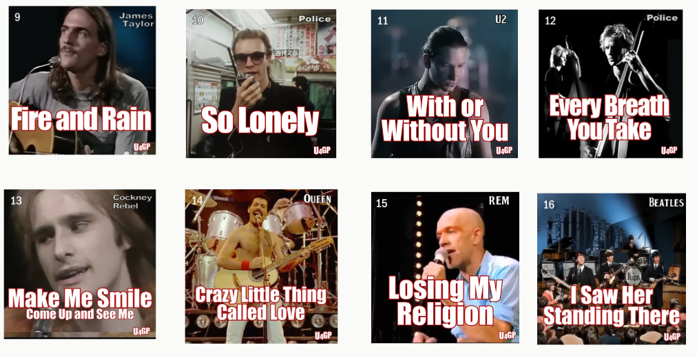
Firstly, the Songbook presents a simple array of thumbnails, one per song.
The Songpage
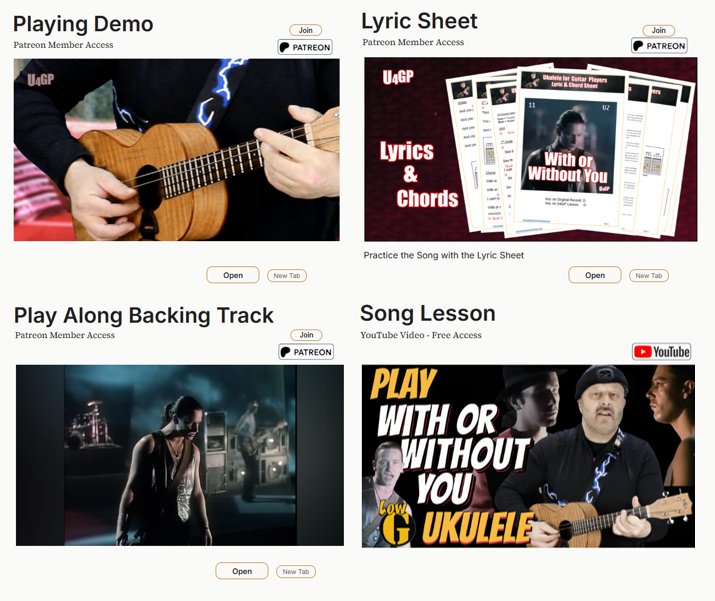
Click any thumbnail and you land on a 'Homepage' for that song. I call this the "Songpage". Here, all available learning materials for that song are displayed.
Accessing Content
Click on an artefact thumbnail or click the 'Open' button and that item opens in the same tab.
Demo's, Lyric Sheets and Backing Tracks are hosted on Patreon. Non members can browse these artefacts but membership is required to unlock them. YouTube and Vimeo content is free. A 'Back to Songpage' button brings you back to the Songpage
Side-by-Side
On desktop, clicking 'New Tab' opens that artefact in a new tab. So for example, you can watch a video and follow a lyric sheet side by side. YouTube content is always opened in a new tab. When finished with content in a new tab simply close that tab
Navigation
On each Songpage you'll find buttons to move to the Next or Previous Song, or Return to the Songbook
Learning
© 2026. UkuleleForGuitarPlayers.com.
About
Operated by BiggyWiggy International Ltd (Ireland)


Question / Comment / Suggestion?
All Rights Reserved